

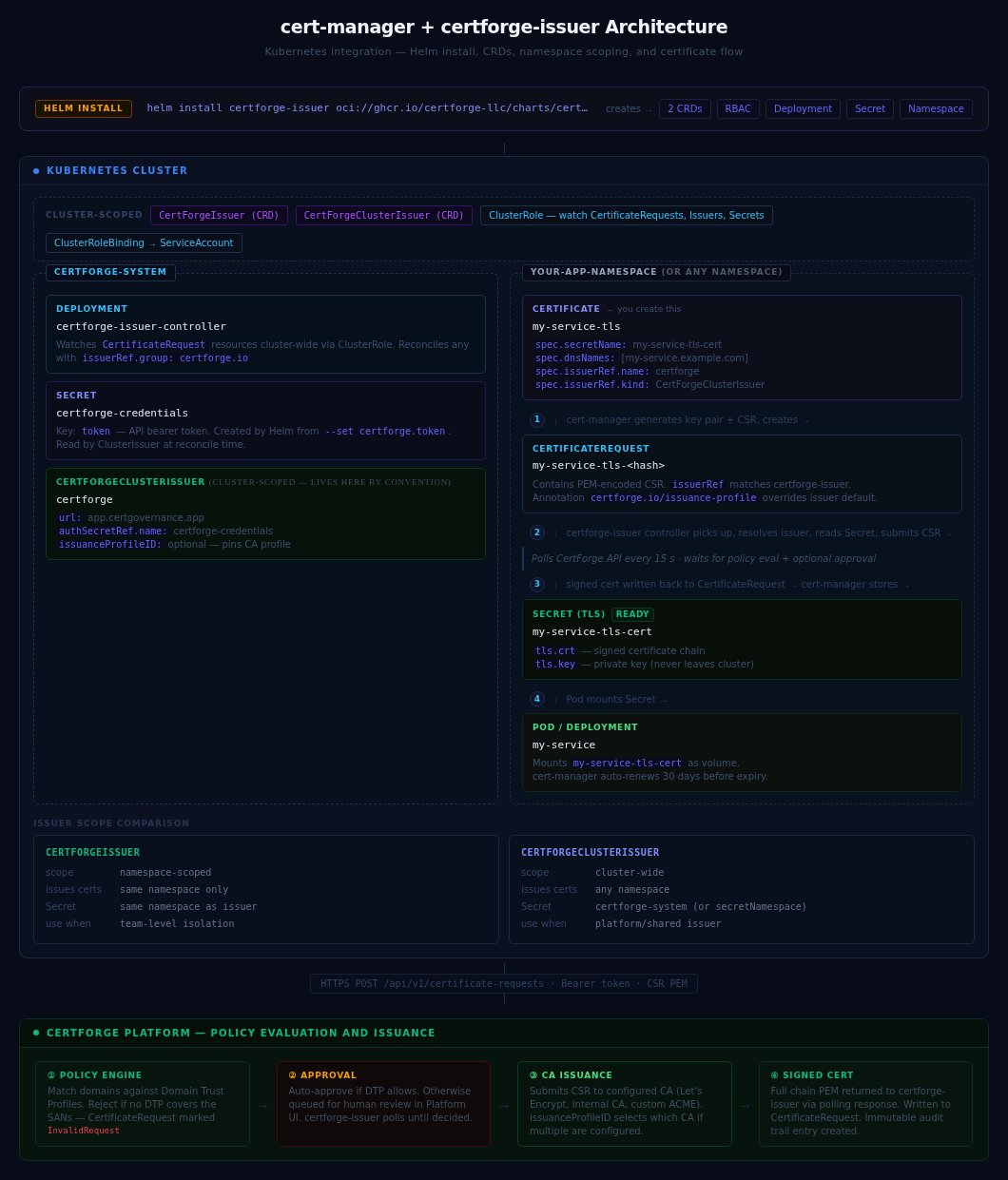
certforge-issuer is the cert-manager external issuer controller that bridges Kubernetes CertificateRequest objects to the CertForge API. It runs as a Deployment in your cluster and watches for CertificateRequest resources directed at CertForgeIssuer or CertForgeClusterIssuer objects.
For installation and quick-start usage, see the cert-manager Integration guide.
Version compatibility
Always use the latest patch release. Run
helm search repo certforge-issuer --versions to list available releases.
Helm chart values
Install or upgrade withhelm upgrade --install:
Full values reference
CRD reference
CertForgeIssuer
Namespaced resource. Issues certificates only forCertificateRequest objects in the same namespace.
Exactly one of authSecretRef, workloadIdentity, or mtlsSecretRef must be set.
CertForgeClusterIssuer
Cluster-scoped resource. Issues certificates forCertificateRequest objects in any namespace. When using Secret-based auth, the Secret must be in the certforge-system namespace (or secretNamespace if overridden).
Authentication
Secret-based (default)
The controller reads a long-lived API token from a Kubernetes Secret. Create the token under Settings → API Keys in the CertForge dashboard (needsread and enroll scopes).
CertForgeIssuer (namespaced), create the Secret in the issuer’s namespace:
Workload Identity (recommended for production)
Workload Identity lets the controller authenticate using a short-lived projected ServiceAccount token instead of a long-lived API key. The kubelet writes and rotates the token automatically — no Kubernetes Secret is required. How it works:- The Helm chart adds a projected
serviceAccountTokenvolume to the controller pod. - The kubelet writes a signed OIDC JWT to
/var/run/secrets/certforge/token, bound to the configured audience. - The controller re-reads this file on every API call — token rotation is fully transparent.
- CertForge validates the JWT against the cluster’s OIDC JWKS endpoint and grants the permissions configured in the matching Workload Identity Provider.
Step 2 — Configure a Workload Identity Provider in CertForge:
Go to Settings → Workload Identity → Add Provider:
Step 3 — Install or upgrade with workload identity enabled:
authSecretRef):
- Add the Workload Identity Provider in CertForge (Step 2 above).
- Upgrade the Helm chart with
workloadIdentity.enabled=trueandtokenSecret.create=false. - Update the issuer spec to use
workloadIdentityinstead ofauthSecretRef. - Once
Ready=Trueis confirmed, delete the old Secret.
mTLS client certificate (v0.3.x+)
Authenticate the issuer controller using a mutual-TLS client certificate issued by CertForge. This connects directly to the CertForge agent endpoint on port 8443, bypassing Cloudflare — the same mechanism used by the connector and discovery agents. Step 1 — Install the enroll helper on a host that can reach your cluster:- Go to Integrations → Connector Agents
- Click + Enroll Agent and choose type Issuer
- Give it a label (e.g.
prod-cluster) - Copy the one-time token
certforge-mtls in certforge-system containing:
Step 4 — Install or upgrade the Helm chart pointing at the Secret:
The agent host and port (Step 6 — Verify:certforge.mtlsHost,certforge.mtlsPort) are Helm chart values configured at the controller level — not fields on the issuer CR. Pass them duringhelm installorhelm upgradewith--set certforge.mtlsHost=usagent.certgov.app --set certforge.mtlsPort=8443.
certforge-issuer-enroll with the same --secret and --label to issue a fresh credential set — the controller re-reads the Secret on the next reconcile without a restart.
To revoke a certificate immediately: go to Integrations → Connector Agents, find the agent, and click Revoke Cert.
RBAC
The controller’s service account is granted the following permissions by the Helm chart:
No cluster-wide Secret read access is granted.
Security hardening
NetworkPolicy
Restrict the controller pod to only the traffic it actually needs. Enable withnetworkPolicy.enabled=true in your values. Requires a CNI with NetworkPolicy support (Calico, Cilium, etc.).
When enabled, the policy allows:
Prometheus metrics
Enable aServiceMonitor for Prometheus Operator integration:
:8080/metrics.
Controller logs
The controller writes structured JSON logs:Upgrading
v0.2.x → v0.3.x
AddsmtlsSecretRef field to both issuer kinds and mtlsHost / mtlsPort Helm chart values for the controller. Existing authSecretRef- and workloadIdentity-based issuers continue to work without changes.
v0.1.x → v0.2.x
authSecretRef is now an optional pointer field (previously required). Existing authSecretRef-based issuers continue to work without changes. The new workloadIdentity field is the alternative.
High availability
certforge-system.
Uninstall
CertificateRequest objects or Kubernetes Secrets containing issued certificates — those remain intact.