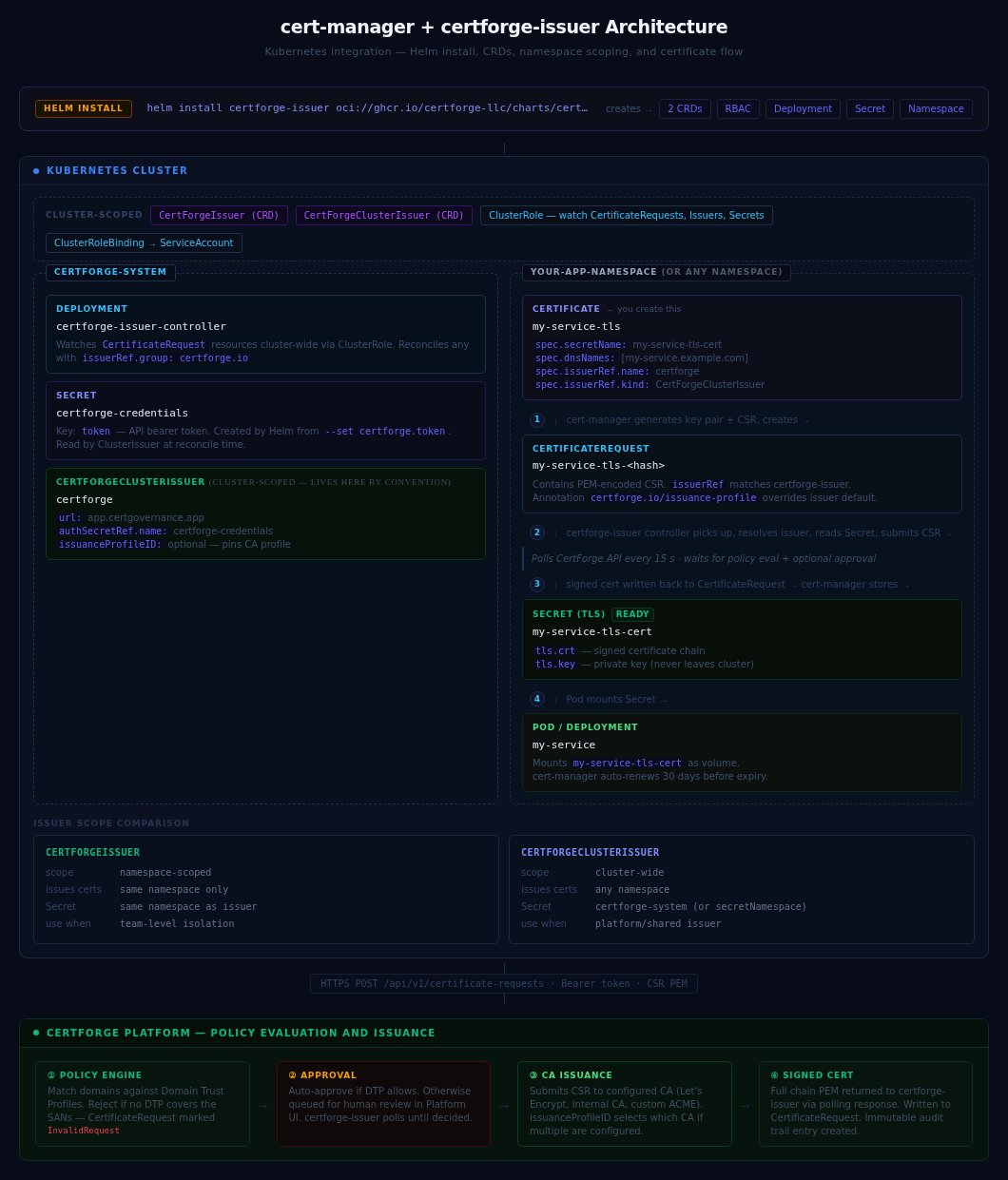
 ## Version compatibility
| certforge-issuer | cert-manager | Kubernetes | CertForge API |
| ---------------- | ------------ | ---------- | ------------- |
| v0.2.x | v1.14+ | 1.27+ | v1 |
| v0.1.x | v1.14+ | 1.24+ | v1 |
Always use the latest patch release. Run `helm search repo certforge-issuer --versions` to list available releases.
***
## Helm chart values
Install or upgrade with `helm upgrade --install`:
```bash theme={null}
helm upgrade --install certforge-issuer oci://ghcr.io/certforge-llc/charts/certforge-issuer \
--namespace certforge-system \
--create-namespace \
--values values.yaml
```
### Full values reference
```yaml theme={null}
certforge:
# URL of your CertForge instance (required)
url: https://app.certgov.app
# API token — stored as a Kubernetes Secret.
# Required when using Secret-based auth (the default).
# Not needed when workloadIdentity.enabled=true.
token: ""
# Optional: default issuance profile ID applied to all requests from this issuer
issuanceProfileID: ""
# Optional: override the namespace where the credentials Secret is looked up
# (CertForgeClusterIssuer only — defaults to certforge-system)
secretNamespace: ""
tokenSecret:
# Set true to create the Secret from certforge.token above
create: true
name: certforge-credentials
replicaCount: 1
image:
repository: ghcr.io/certforge-llc/certforge-issuer
tag: "" # defaults to chart appVersion
pullPolicy: IfNotPresent
resources:
requests:
cpu: 10m
memory: 32Mi
limits:
cpu: 100m
memory: 64Mi
# Leader election — recommended when running multiple replicas
leaderElect: true
# Workload Identity — authenticate using projected ServiceAccount tokens
# instead of a long-lived API key stored in a Secret. See the
# "Workload Identity" section below for full setup instructions.
workloadIdentity:
enabled: false
audience: "https://app.certgov.app" # must match the CertForge WI Provider
expirationSeconds: 3600 # kubelet rotates token before this deadline
tokenFile: "/var/run/secrets/certforge/token"
# NetworkPolicy — restrict pod traffic to only what the controller needs.
# Requires a CNI with NetworkPolicy support (Calico, Cilium, etc.).
networkPolicy:
enabled: false
kubeApiServerPort: 6443 # set to 443 for managed clusters (EKS, GKE, AKS)
# ServiceMonitor — Prometheus Operator integration.
# Requires prometheus-operator or kube-prometheus-stack.
serviceMonitor:
enabled: false
interval: 30s
scrapeTimeout: 10s
# Labels required by your Prometheus Operator's selector, e.g.:
# additionalLabels: {release: prometheus}
additionalLabels: {}
```
***
## CRD reference
### CertForgeIssuer
Namespaced resource. Issues certificates only for `CertificateRequest` objects in the same namespace.
Exactly one of `authSecretRef` or `workloadIdentity` must be set.
```yaml theme={null}
apiVersion: certforge.io/v1alpha1
kind: CertForgeIssuer
metadata:
name: certforge
namespace: default
spec:
# URL of the CertForge instance (required)
url: https://app.certgov.app
# Option A: Secret-based auth (long-lived token)
# Secret must be in the same namespace as this issuer.
authSecretRef:
name: certforge-credentials
# Option B: Workload Identity (short-lived projected ServiceAccount token)
# workloadIdentity:
# audience: https://app.certgov.app
# tokenFile: /var/run/secrets/certforge/token # optional, this is the default
# Optional: default issuance profile ID for requests handled by this issuer
issuanceProfileID: ""
```
**Status conditions:**
| Condition | Status | Meaning |
| --------- | ------- | ------------------------------------------------------ |
| `Ready` | `True` | Issuer connected to CertForge and ready to sign |
| `Ready` | `False` | Cannot reach CertForge — check URL, token, and network |
```bash theme={null}
kubectl get certforgeissuer certforge -n default -o yaml
```
### CertForgeClusterIssuer
Cluster-scoped resource. Issues certificates for `CertificateRequest` objects in any namespace. When using Secret-based auth, the Secret must be in the `certforge-system` namespace (or `secretNamespace` if overridden).
```yaml theme={null}
apiVersion: certforge.io/v1alpha1
kind: CertForgeClusterIssuer
metadata:
name: certforge
spec:
url: https://app.certgov.app
# Option A: Secret-based auth
# Secret must be in certforge-system (or secretNamespace)
authSecretRef:
name: certforge-credentials
# Option B: Workload Identity (no Secret needed)
# workloadIdentity:
# audience: https://app.certgov.app
# Optional
issuanceProfileID: ""
secretNamespace: "" # CertForgeClusterIssuer only
```
```bash theme={null}
kubectl get certforgeclusterissuer certforge -o yaml
```
***
## Authentication
### Secret-based (default)
The controller reads a long-lived API token from a Kubernetes Secret. Create the token under **Settings → API Keys** in the CertForge dashboard (needs `read` and `enroll` scopes).
```bash theme={null}
# Create
kubectl create secret generic certforge-credentials \
--namespace certforge-system \
--from-literal=token=
## Version compatibility
| certforge-issuer | cert-manager | Kubernetes | CertForge API |
| ---------------- | ------------ | ---------- | ------------- |
| v0.2.x | v1.14+ | 1.27+ | v1 |
| v0.1.x | v1.14+ | 1.24+ | v1 |
Always use the latest patch release. Run `helm search repo certforge-issuer --versions` to list available releases.
***
## Helm chart values
Install or upgrade with `helm upgrade --install`:
```bash theme={null}
helm upgrade --install certforge-issuer oci://ghcr.io/certforge-llc/charts/certforge-issuer \
--namespace certforge-system \
--create-namespace \
--values values.yaml
```
### Full values reference
```yaml theme={null}
certforge:
# URL of your CertForge instance (required)
url: https://app.certgov.app
# API token — stored as a Kubernetes Secret.
# Required when using Secret-based auth (the default).
# Not needed when workloadIdentity.enabled=true.
token: ""
# Optional: default issuance profile ID applied to all requests from this issuer
issuanceProfileID: ""
# Optional: override the namespace where the credentials Secret is looked up
# (CertForgeClusterIssuer only — defaults to certforge-system)
secretNamespace: ""
tokenSecret:
# Set true to create the Secret from certforge.token above
create: true
name: certforge-credentials
replicaCount: 1
image:
repository: ghcr.io/certforge-llc/certforge-issuer
tag: "" # defaults to chart appVersion
pullPolicy: IfNotPresent
resources:
requests:
cpu: 10m
memory: 32Mi
limits:
cpu: 100m
memory: 64Mi
# Leader election — recommended when running multiple replicas
leaderElect: true
# Workload Identity — authenticate using projected ServiceAccount tokens
# instead of a long-lived API key stored in a Secret. See the
# "Workload Identity" section below for full setup instructions.
workloadIdentity:
enabled: false
audience: "https://app.certgov.app" # must match the CertForge WI Provider
expirationSeconds: 3600 # kubelet rotates token before this deadline
tokenFile: "/var/run/secrets/certforge/token"
# NetworkPolicy — restrict pod traffic to only what the controller needs.
# Requires a CNI with NetworkPolicy support (Calico, Cilium, etc.).
networkPolicy:
enabled: false
kubeApiServerPort: 6443 # set to 443 for managed clusters (EKS, GKE, AKS)
# ServiceMonitor — Prometheus Operator integration.
# Requires prometheus-operator or kube-prometheus-stack.
serviceMonitor:
enabled: false
interval: 30s
scrapeTimeout: 10s
# Labels required by your Prometheus Operator's selector, e.g.:
# additionalLabels: {release: prometheus}
additionalLabels: {}
```
***
## CRD reference
### CertForgeIssuer
Namespaced resource. Issues certificates only for `CertificateRequest` objects in the same namespace.
Exactly one of `authSecretRef` or `workloadIdentity` must be set.
```yaml theme={null}
apiVersion: certforge.io/v1alpha1
kind: CertForgeIssuer
metadata:
name: certforge
namespace: default
spec:
# URL of the CertForge instance (required)
url: https://app.certgov.app
# Option A: Secret-based auth (long-lived token)
# Secret must be in the same namespace as this issuer.
authSecretRef:
name: certforge-credentials
# Option B: Workload Identity (short-lived projected ServiceAccount token)
# workloadIdentity:
# audience: https://app.certgov.app
# tokenFile: /var/run/secrets/certforge/token # optional, this is the default
# Optional: default issuance profile ID for requests handled by this issuer
issuanceProfileID: ""
```
**Status conditions:**
| Condition | Status | Meaning |
| --------- | ------- | ------------------------------------------------------ |
| `Ready` | `True` | Issuer connected to CertForge and ready to sign |
| `Ready` | `False` | Cannot reach CertForge — check URL, token, and network |
```bash theme={null}
kubectl get certforgeissuer certforge -n default -o yaml
```
### CertForgeClusterIssuer
Cluster-scoped resource. Issues certificates for `CertificateRequest` objects in any namespace. When using Secret-based auth, the Secret must be in the `certforge-system` namespace (or `secretNamespace` if overridden).
```yaml theme={null}
apiVersion: certforge.io/v1alpha1
kind: CertForgeClusterIssuer
metadata:
name: certforge
spec:
url: https://app.certgov.app
# Option A: Secret-based auth
# Secret must be in certforge-system (or secretNamespace)
authSecretRef:
name: certforge-credentials
# Option B: Workload Identity (no Secret needed)
# workloadIdentity:
# audience: https://app.certgov.app
# Optional
issuanceProfileID: ""
secretNamespace: "" # CertForgeClusterIssuer only
```
```bash theme={null}
kubectl get certforgeclusterissuer certforge -o yaml
```
***
## Authentication
### Secret-based (default)
The controller reads a long-lived API token from a Kubernetes Secret. Create the token under **Settings → API Keys** in the CertForge dashboard (needs `read` and `enroll` scopes).
```bash theme={null}
# Create
kubectl create secret generic certforge-credentials \
--namespace certforge-system \
--from-literal=token=/locations/